TaskList
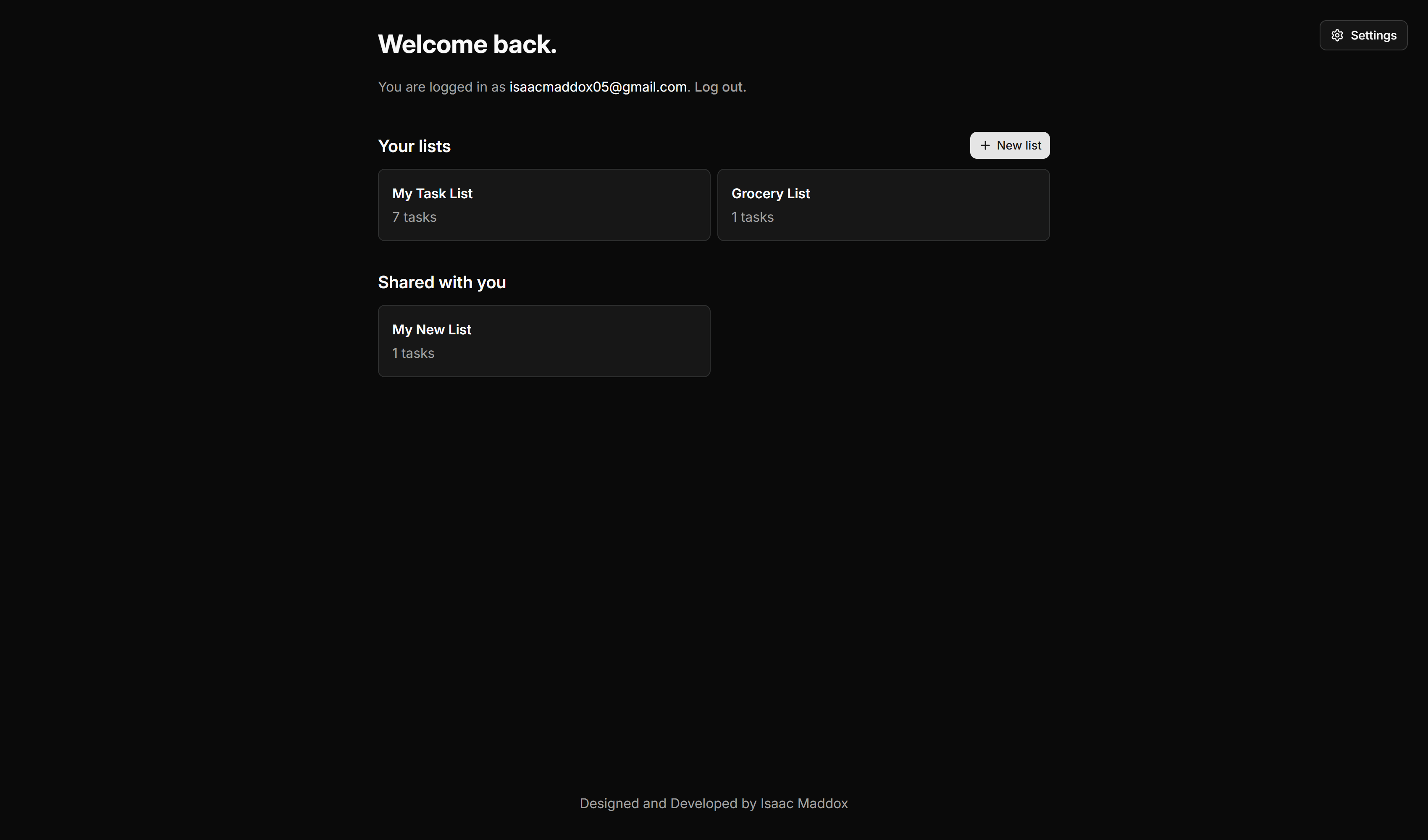
TaskList is a web application that I developed for a local law firm in Pensacola after they lost their existing tool.
Motivation
Why I created TaskList
TaskList was developed to replace a tool that was being phased out at a local law firm in Pensacola. The firm previously used the Outlook task feature, and couldn't continue using it after the recent Outlook update. When I learned of this, I talked with an employee, who is conveniently my girlfriend, to learn what they needed for this project.
Requirements and Planning
This project had fairly simple requirements:
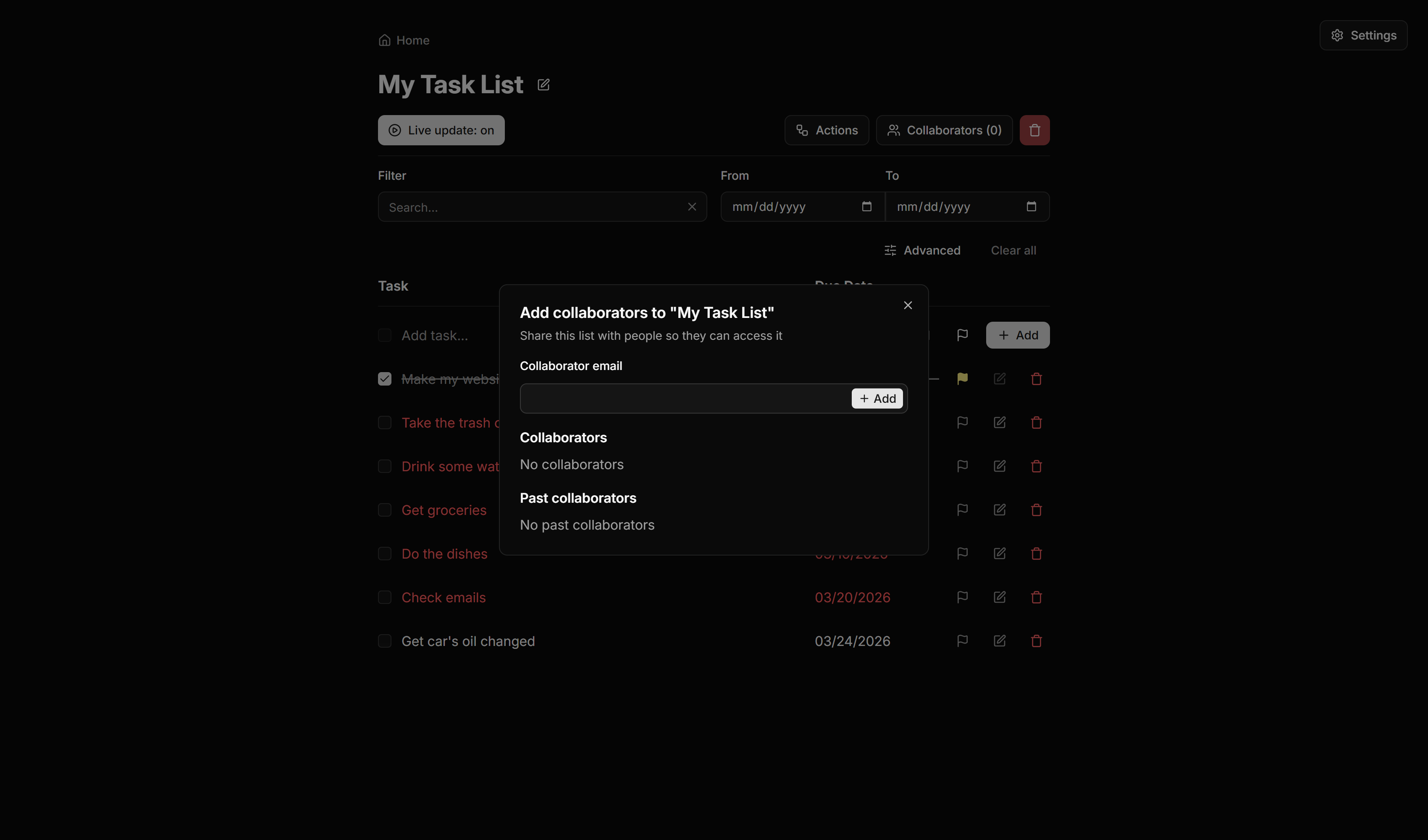
- Create, edit, and delete lists including a “shares” list for collaboration
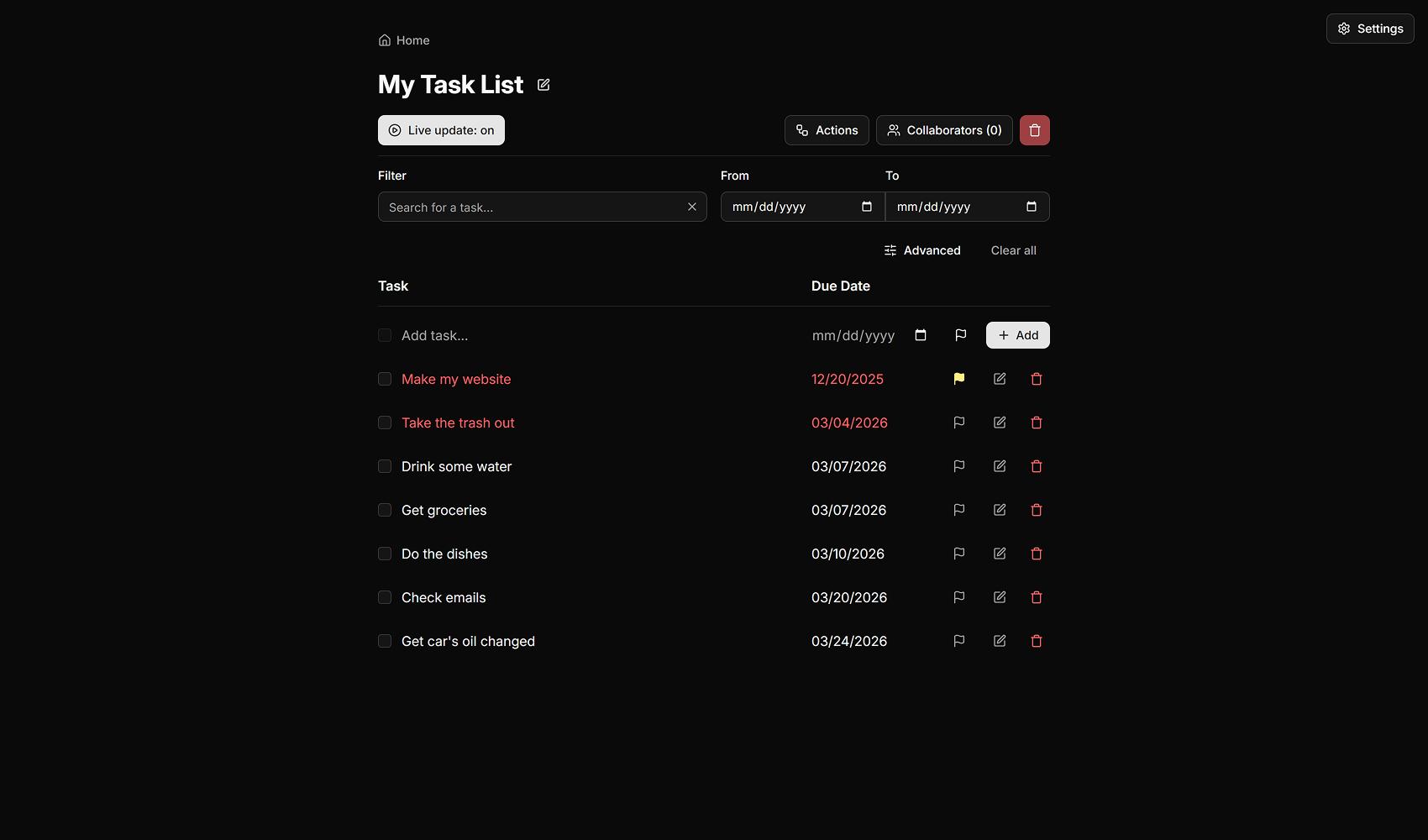
- Create, edit, and delete tasks with a name, due date, and priority toggle
- Provide optional live updates to client machines
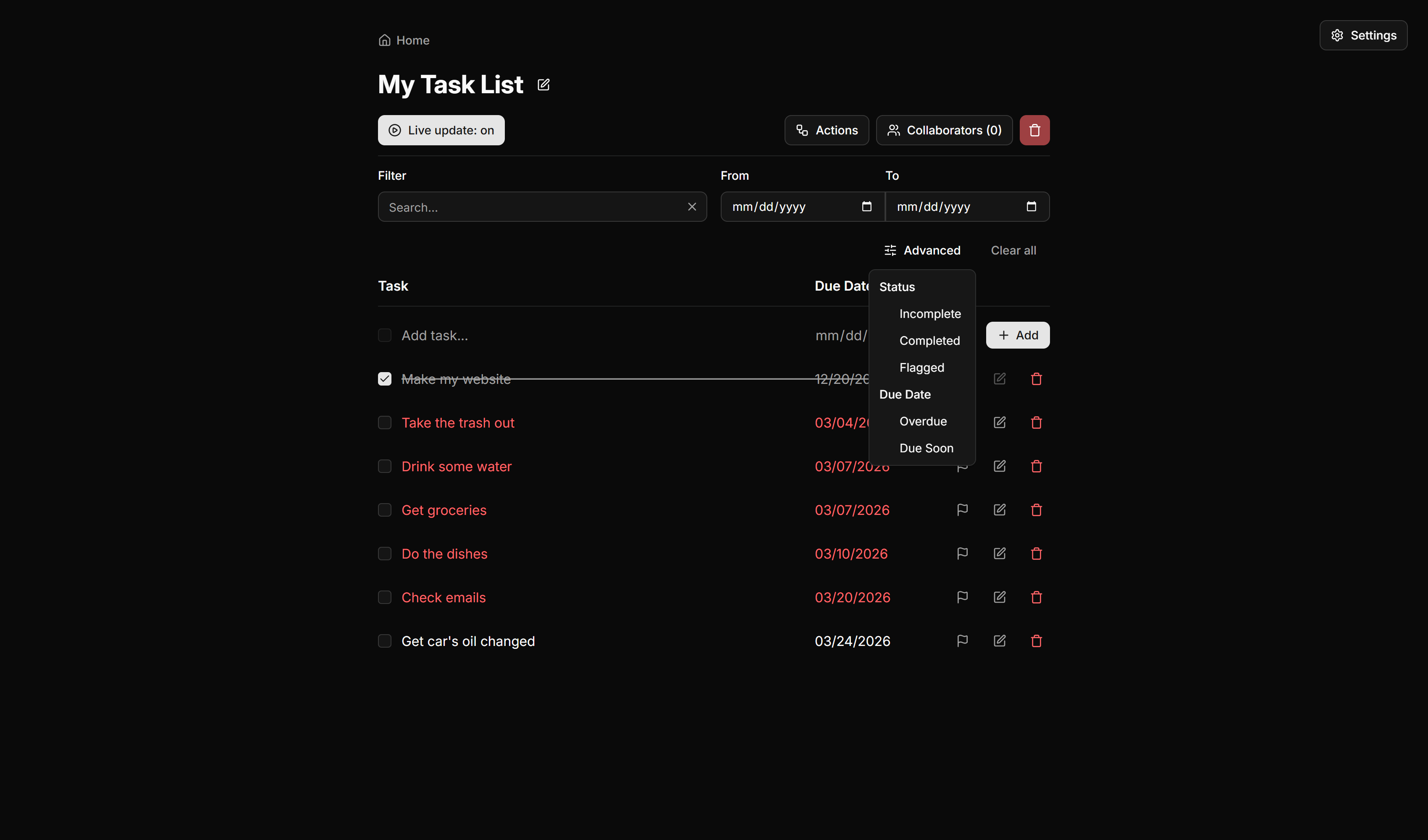
- Filter and search all tasks in a list
After gathering these requirements, I began planning how I would build this project. Because of the need for live updates, I believed that Firebase Realtime Database would be a good choice for the database. This would give me a flexible JSON tree (allowing for future updates easier than a traditional relational database) and stupid simple realtime updates.
I then worked from this — I chose to use Vite to bundle an entirely client-side application to prioritize speed. I have a fondness for React, especially for projects like this — with large, repetitive datasets that just make sense to be broken into components. TypeScript is always my go-to when I get to choose, so I scaffolded a Vite React + TS project. I also decided to use ShadCN UI to make the user interface development even speedier, with the added bonus of out-of-the-box accessibility!
Development & Early Life
The development for TaskList took a couple of weeks alongside my part-time job and school. I worked on it every chance I got during the evenings. When I get a project to work on and have a true purpose for it, it is easy for me to get carried away. This happened many nights, I would stay up until well past midnight without realizing it.
After I finished the initial 1.0 version, I had my girlfriend test and give me feedback. Once she was satisfied, the project was presented to one of the partners at the law firm and readily adopted!
Code Insights
A couple of weeks after TaskList went into daily use and a few more requests trickled down the pipeline, I decided that I wanted to rewrite most of the internals. The code, while working, was convoluted and did not have clear separation of concerns. I chose to rewrite from scratch using a strict tier system for the parts of the app.
I implemented services to handle database interaction, allowing for a migration to another database technology if that should be a requirement later in the lifetime of this product.
I made sure while implementing these services to type all communications between layers to allow for an easier developer experience. Below you can read the file containing the overarching types that I used for my service layer.
src/lib/services/index.ts
import * as Sentry from "@sentry/react";

type Nothing = { nothing: never };

export type ServiceReturnType<TShape = Record<string, unknown>, TData extends object = Nothing> =
   | (TData extends Nothing
        ? { success: true; errors?: never; data?: never }
        : { success: true; errors?: never; data: TData })
   | ServiceErrorType<TShape>;

export type ServiceErrorType<TShape = Record<string, unknown>> = {
   success: false;
   data?: never;
   errors?: {
      [Key in keyof TShape]?: string;
   } & {
      general?: string;
   };
};

export interface HandleErrorOptions {
   message?: string;
   severity?: Sentry.SeverityLevel;
   permissionErrorMessage?: string;
}
Database Security
While architecting this project, I studied Firebase's security system so that I could best protect users' data. I made it clear to the clients that no confidential information should be entered into the program, but that there should also be no unauthorized data use because of the security rules.
Firebase RTDB uses a top-down approach to security, meaning once someone has permission to access a specific data point in the JSON tree, they can access all of its children too. After research and much testing, I ended up with the following security rules in Firebase:
Firebase security rules
{
   "rules": {
      "lists": {
         ".read": true,
         ".indexOn": [
            "owner_id",
            // rest of this list omitted for privacy protection
         ],
         "$listId": {
            // Write to a list if:
            //
            // You are logged in
            //
            // AND
            //
            // (
            //   (
            //     You are making a new list
            //
            //     AND
            //
            //     You are making a list with 'owner_id' equal to your UID
            //   )
            //
            //   OR
            //
            //   The list's 'owner_id' is your UID
            // )
            ".write": "auth.uid !== null && ( ( !data.exists() && newData.child('owner_id').val() === auth.uid ) || data.child('owner_id').val() === auth.uid )",
            "tasks": {
               // Write to tasks if:
               //
               // You are logged in
               //
               // AND
               //
               // Your UID is in the list's 'shares' property
               ".write": "auth.uid !== null && ( data.parent().child('shares').child(auth.token.email.replace('.', ',')).val() === true )"
            },
            "shares": {
               "$emailKey": {
                  ".write": "auth.uid !== null && ( data.parent().parent().child('owner_id').val() === auth.uid || ( data.parent().child(auth.token.email.replace('.', ',')).val() === true && newData.val() === true && data.parent().parent().child('owner_id').val() !== auth.uid ) )",
               }
            }
         }
      }
   }
}
Feedback
Since the law firm adopted my program as their daily use task tracker, they have experienced less headache and more freedom to do what they need in the program. Through constant communication with the daily users of the application, I have delivered multiple new features that help to improve their menial tasks, such as deleting all completed tasks or even duplicating tasks to happen at fixed intervals.
I asked for direct feedback from a few employees at the law firm, and this is what they had to say:
Isaac Maddox made my life (and my co-workers') much easier by creating this program for our tasks. Managing everything is a lot of work, and when we lost our previous task list, we were all in a panic. Mr. Maddox truly came to the rescue with this solution. The new task list is also very easy to navigate and is a huge improvement over the old one we used in our previous email program.
Haley, employee at the law firm
After our firm's conversion to Windows 11, we quickly discovered that Outlook's Task Program no longer fit our team's needs…. Isaac Maddox learned of our struggles, listened to what we needed as a group, and rapidly built a program designed with us in mind. After Beta testing the new program, he quickly and efficiently implemented a few design suggestions, and we were able to launch before any of us thought possible. Isaac Maddox saved our team a lot of headaches and additional unnecessary stress by listening to our needs and designing a program that worked for us and hectic schedules. I would highly recommend him for your programming needs.
Amanda, employee at the law firm